Every small business owner knows the moment: you’re with a customer or up a ladder, and the phone rings. Let it ring and you might lose the job. An AI receptionist promises a third option: something that picks up, answers the common questions, books the appointment and passes the rest to you.
This guide covers the four kinds of AI receptionist, what they do well, where they still need a person, the Canadian privacy rules that apply and what a sensible setup looks like in 2026.
The short answer: An AI receptionist is good at repetitive front-desk work: answering every call, giving answers you’ve approved, booking into your calendar, taking messages and sending reminders. It isn’t a replacement for judgement. Emergencies, complaints, pricing exceptions and anything sensitive should go to a person, with a clear way to hand them over. In Canada, you’re also responsible for telling people how their information is used and, if you record calls, getting their consent.
What people mean by an "AI receptionist"
The term covers any software that handles the first conversation with a customer on your behalf, by voice or text. Newer tools use large language models, the technology behind AI chat assistants, so they can understand a caller who explains things in their own words instead of pressing 1 for bookings.
Adoption is growing, but it’s far from universal. In Statistics Canada’s business survey for the second quarter of 2026, 19.2% of businesses reported using AI to produce goods or deliver services over the past year, roughly triple the 6.1% of the second quarter of 2024. Among those businesses, 28.2% used virtual agents or chatbots and 20.6% used speech or voice recognition. Among businesses with 1 to 4 employees, 19.9% reported using AI, while 41.4% said it isn’t relevant to them (Statistics Canada).
Broader surveys find higher numbers. In BDC’s 2025 State of Entrepreneurship survey, half of small and medium-sized businesses said they use AI for some task, and 16% use it for customer service (BDC). The surveys measure different things, but the message is the same: many businesses are trying AI, and most are still working out where it fits.
Four kinds: phone agent, website chatbot, WhatsApp/SMS and workflow automation
You rarely need all four at once. Start where you lose the most enquiries.
AI phone answering agent
Answers your business number with a natural-sounding voice, on every call or only when you’re busy or closed. It answers questions, books appointments, takes detailed messages and transfers the call or alerts someone when it’s urgent. It suits businesses whose customers still call first, such as trades, clinics and salons.
Website AI chatbot
Answers website visitors in writing, day or night, using your own service pages, approved prices and policies. It collects contact details when someone is ready to book. It suits sites with plenty of visitors but few form fills.
WhatsApp and SMS automation
Handles text conversations: a text-back when you miss a call, replies to common questions, booking links, confirmations and reminders. Many customers would rather text than talk about something as simple as “Are you open Saturday?”
Workflow automation
The part customers never see. It moves the details from a call, chat or text into your calendar, CRM or job management tool, alerts the right person and starts the follow-up. Without it, an AI receptionist just creates one more inbox to check.
Jobs it does well: answering calls, booking, taking messages, FAQs
AI receptionists are strongest where the work is frequent, predictable and based on information you can write down.
- Answering every call. No busy signals or full voicemail boxes, even with several calls at once, over lunch or after hours.
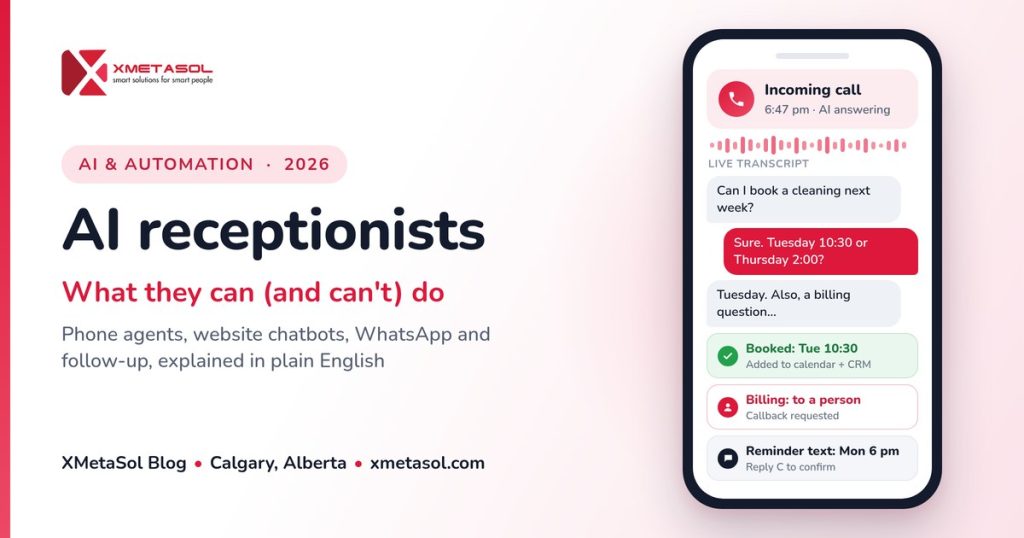
- Booking appointments. With your calendar and booking rules (how long each service takes, buffers, who does what, where you work), it can offer real time slots and confirm them.
- Taking proper messages. It asks the questions a busy person forgets: name, callback number, address, what the problem is and how urgent it is. The message arrives written up, not as a voicemail to replay.
- Answering frequent questions. Hours, location, services, service area, payment and cancellation policy. If you’ve answered it 50 times, it can answer it the 51st.
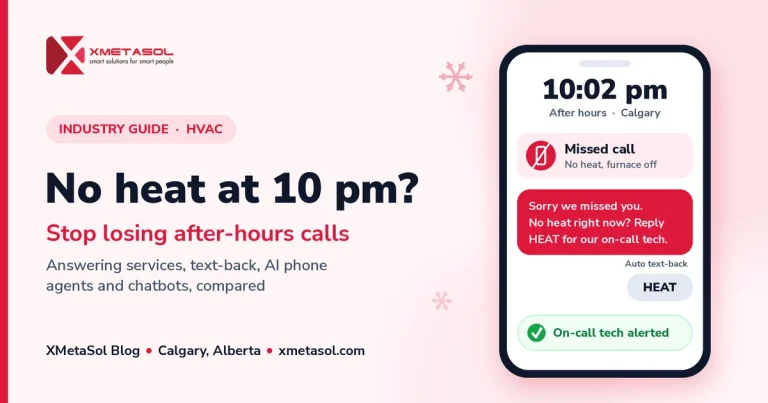
If you run an emergency trade, our guide to stopping lost after-hours calls covers routing real emergencies to an on-call technician.
An AI receptionist only knows its instructions, your approved information and the systems it’s connected to. A clear one-page FAQ, written by whoever answers your phones now, is often the most valuable part of the setup.
Where it falls short and needs a human
AI tools can sound confident and still be wrong. Canada’s federal, provincial and territorial privacy commissioners note that generative AI can produce incorrect information, and that accountability for decisions rests with the organization using it, not the automated system (Office of the Privacy Commissioner of Canada). If your AI receptionist promises something, your business made the promise. Plan for a person to handle:
- Emergencies and safety. Gas smells, flooding, injuries. The agent should tell the caller what to do (for example, call 911) and alert a person straight away, not troubleshoot.
- Complaints. An upset customer wants someone who can fix it.
- Money decisions. Discounts, refunds, custom quotes and payment disputes.
- Diagnosis and advice. A clinic’s agent can book an appointment, but it shouldn’t judge whether a symptom is serious.
- Anything it hasn’t been told. The right answer is “Let me have someone call you back,” not a guess.
- People who want a person. Some callers won’t talk to software, and some need an accommodation. Always offer a way to reach a human.
| Task | AI receptionist can usually handle | Hand to a person when |
|---|---|---|
| Answering the phone | Every call, including several at once and after hours | The caller asks for a person or the agent can’t understand them |
| Booking | Standard appointments using your calendar rules | The job needs a site visit to scope, special equipment or a staff decision |
| Questions | Hours, services, service area and written policies | The answer isn’t in its approved information |
| Pricing | Published prices and ranges you’ve approved | Quotes, discounts, refunds or disputes |
| Urgent calls | Recognizing urgency and alerting your on-call person | Always, for emergencies and safety issues |
| Complaints | Taking the details and logging the issue | Always, for the conversation itself |
| Follow-up | Confirmations, reminders and polite check-ins | The customer replies with a problem it can’t solve |
Following up leads and reminders automatically
A good front desk also follows up. This is where workflow automation earns its place.
- Instant acknowledgement. Every form, chat or missed call gets a quick reply saying what happens next.
- Automatic CRM entries. Every enquiry lands in your CRM, so nothing lives only in someone’s phone.
- Quote follow-up. A polite check-in a few days after a quote, which stops as soon as the customer replies.
- Appointment reminders. A confirmation, a reminder the day before and an easy way to reschedule instead of a no-show.
- After the job. A thank-you and, where it fits, a review request. Our Google Business Profile checklist explains how to ask within Google’s rules.
Keep replies to a customer’s own request separate from promotions. Under Canada’s Anti-Spam Legislation (CASL), commercial messages sent to an electronic address, which includes text messages and instant messaging accounts, require consent, sender identification and a simple way to opt out, for example by texting STOP. The CRTC says a pre-checked box isn’t valid express consent and that the burden of proving consent sits with the sender (CRTC CASL FAQ).
Privacy, consent and recording rules in Canada
Privacy is the most common worry. In the Statistics Canada survey, cybersecurity or privacy concerns were the barrier businesses most often said limits their AI use (13.4%), ahead of cost (10.6%) (Statistics Canada). This is general information, not legal advice. Most Alberta businesses, including corporations, partnerships and individuals acting in a commercial capacity, are covered by the provincial Personal Information Protection Act (PIPA) (OIPC Alberta). Businesses elsewhere may fall under the federal PIPEDA or their own provincial law.
Tell people it’s AI. The commissioners’ principles say people using a public-facing generative AI tool should be made aware that it’s AI (Office of the Privacy Commissioner of Canada). One line in the greeting does it: “You’ve reached [Business]. I’m the virtual assistant, and I can book an appointment or take a message.”
Collect only what you need, and say why. PIPA limits collection to reasonable purposes and to what is reasonably needed for them. You usually need consent, and you must explain the purpose and who can answer questions (Government of Alberta). A booking needs a name, a number and a reason for the visit, not a birth date.
Recordings and transcripts. Most AI phone tools record or transcribe calls. The OPC’s guidance says to tell callers about the recording, state the purpose clearly and narrowly, and get consent. If the caller continues after being told about the recording and its purpose, consent is usually implied, and if recording isn’t integral to the service, callers should be offered an alternative (Office of the Privacy Commissioner of Canada). The guidance is written for businesses under PIPEDA and described as best practice for others. Separately, the Criminal Code makes intercepting a private communication an offence unless, among other exceptions, the caller or the person they called consents (Criminal Code).
Providers outside Canada. Many AI and phone platforms process data abroad. If yours does, PIPA requires your policies to name the country and purposes, and you must tell people how to get those policies and who can answer questions (Government of Alberta).
Security and retention. PIPA requires reasonable security and keeping personal information only as long as reasonably needed. Breaches posing a real risk of significant harm must be reported to Alberta’s Information and Privacy Commissioner (Government of Alberta). Set a deletion period for recordings.
Clinics. In Alberta, dentists, chiropractors, physiotherapists and other regulated members of 13 designated health professions are custodians under the Health Information Act, which requires privacy impact assessments before introducing or changing information systems. Contractors and information managers must follow the custodian’s rules (OIPC Alberta).
Outbound calls are different. If you want an AI agent to make sales calls, the CRTC’s Unsolicited Telecommunications Rules apply, including calling hours, the National Do Not Call List and prior express consent for robocalls that solicit (CRTC).
What setup involves and how long it takes
A focused AI receptionist project usually runs in five stages. Most of the time goes into decisions and testing, not technology.
- Map your calls. List the ten most common reasons people contact you, what should happen for each and what counts as urgent. Count today’s missed calls so you can measure the change.
- Write the knowledge. Services, service area, hours, policies, approved prices and the exact wording for sensitive answers. Decide what it must never say or promise.
- Connect the systems. Phone number or forwarding, calendar, CRM, SMS or WhatsApp, and who gets alerted for what.
- Test with real scenarios. Your team calls in as difficult customers. Include bad lines, vague questions and annoyed callers, then fix and retest.
- Go live gradually. Start with after-hours or overflow calls, review transcripts weekly for the first month, then widen coverage.
One channel linked to one calendar and one CRM can realistically be live within a few weeks; more channels or older systems add testing time. Before you switch it on, check that:
- The greeting says it’s a virtual assistant and how to reach a person.
- Callers hear a recording notice, with the purpose, if calls are recorded or transcribed.
- Emergencies and complaints reach a real person, with a backup if they don’t answer.
- Promotional texts only go to people who’ve agreed to them.
- Your privacy policy mentions the tool, where data is stored and how long it’s kept.
- Someone owns the weekly transcript review.
A chatbot is only as good as the website behind it, which is where our website development work starts.
Questions to ask any provider
Get clear answers to these before you sign with anyone:
- Where is our data stored and processed, and by which other companies? You need this for PIPA’s notice on providers outside Canada.
- Are calls recorded or transcribed, how long are they kept, and can we delete them?
- Is our data, or our customers’ data, used to train AI models?
- How does it hand over to a person, and what happens if nobody answers?
- What can it change in our calendar and CRM on its own? Can it cancel, double-book or quote a price?
- What does it do when it doesn’t know? Ask for a live demo with a question it hasn’t been given.
- How is it priced, and what happens to the bill in a busy month?
- If we leave, what happens to our phone number, data and recordings?
How XMetaSol can help
We build AI receptionists for small businesses in Calgary and across Canada: AI phone answering agents that answer calls, book appointments and take messages; website AI chatbots that answer from your own information; WhatsApp and SMS automation for text-backs, confirmations and reminders; and workflow automation for lead follow-up, CRM updates and reminders. Each is set up around your services, hours and hand-off rules, and tested on real scenarios before it goes live. Most automation projects are done in under a month.
See what’s included on our AI solutions page, or how it works for HVAC companies, dental clinics, physio and chiro clinics and real estate teams.
Sources
- Statistics Canada, “Analysis on artificial intelligence use by businesses in Canada, second quarter of 2026” (11 June 2026): statcan.gc.ca
- BDC, “BDC State of Entrepreneurship Report 2025” (October 2025), p. 20: bdc.ca
- Office of the Privacy Commissioner of Canada, “Principles for responsible, trustworthy and privacy-protective generative AI technologies” (7 December 2023): priv.gc.ca
- Office of the Privacy Commissioner of Canada, “Recording of Customer Telephone Calls”: priv.gc.ca
- Justice Laws Website, Criminal Code (R.S.C., 1985, c. C-46), section 184: laws-lois.justice.gc.ca
- Office of the Information and Privacy Commissioner of Alberta, “Personal Information Protection Act (PIPA)”: oipc.ab.ca
- Government of Alberta, “Collecting personal information”: alberta.ca
- Government of Alberta, “Organization responsibilities for protecting personal information”: alberta.ca
- Office of the Information and Privacy Commissioner of Alberta, “Health Information Act (HIA)”: oipc.ab.ca
- CRTC, “Frequently Asked Questions about Canada’s Anti-Spam Legislation”: crtc.gc.ca
- CRTC, “Key Unsolicited Telecommunications Rules”: crtc.gc.ca